For those of you utilizing NAT on your home network–a challenge for the CLI.
Once I was able to finalize the setup of my Plex Server and connect it to my Synology NAS everything looked great, except one issue. That issue was external access outside of my home network. The best part of Plex is being able to watch your movies and TV shows away from home.
Because of my experience as a Cybersecurity Engineer experience (my first post Army Retirement gig), I put all kinds of Access Control Lists (ACL) on all the interfaces of my Cisco Router. That being said and because Plex utilizes TCP 32400 primarily, I thought it was my ACLs blocking access. I will create a new BLOG post on my ACLs what they do later.
True Problem
- I am running PAT on my router.
- All devices that require outside access really don’t like PAT
The Solution
- Adding a static PAT
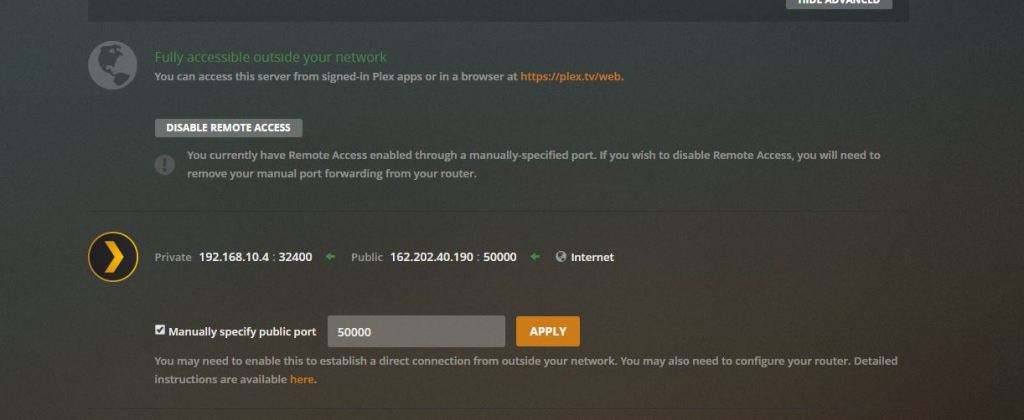
- Configuring Plex to use a manual public port
First the router:
The following commands are an assumption that you have already built your NAT source and destination overload commands and built your NAT ACLs.
You need to enter the following command to apply static NAT for Plex:
ip nat inside source static tcp {plex server ip address} 32400 interface {public facing router interface} 50000
The above is all one line and the {} require your information.
On the Plex Server:
- Login to your local Plex and go to Settings > Remote Access
- Select the box next to “Manually specify public port”
- Enter 50000 select Apply
- Next to the World icon you should get a searching wheel and a green “Fully accessible outside your network”
- Test by using your smart phone, not connected to your home network.
 HOME NETWORKING
Very nicely done.
LikeLike
Thanks William!!
LikeLike
I ran I to the same problem initially, but just setup L2TP VPN Access into my Ubiquiti EdgeRouter. This also lets me access my security camera system remotely as well.
LikeLike